We have updated the SyncFiddle top page and improved several editor features.
Top Page Refresh
The SyncFiddle homepage has been refreshed with a cleaner and more modern design.
- Added a new What's New page
- Updated demo visuals
- Refined the design of buttons and adjusted the color palette for better contrast
- Improved wording
The goal of this update is to make it clearer and easier to start coding right away.
Double-Click to Maximize Panels
You can now double-click the splitter between editor panels to toggle maximize mode.
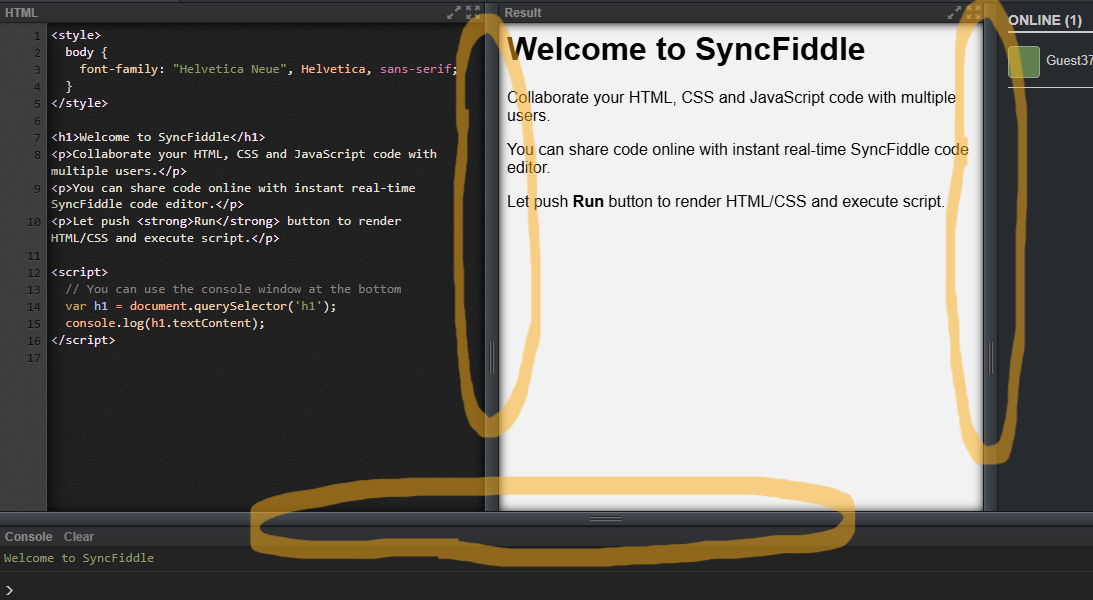
- Double-click the console splitter to maximize the console.
- Double-click again to return to the previous layout.
This makes it easier to temporarily focus on one panel while debugging or presenting.
History Menu Code Preview
The History menu has also been improved.
When opening the History dropdown, you can now preview the code for each room entry. Since room IDs are difficult to remember, this preview helps you quickly identify the correct session.
Note that the preview is available only after clicking the Run button at least once and updated whenever you run code.
We will continue improving SyncFiddle to make real-time collaboration smoother and more intuitive.
Thank you for using SyncFiddle.